> ## Documentation Index
> Fetch the complete documentation index at: https://airmdr-docs-crowdstrike-skills-catalog.mintlify.site/llms.txt
> Use this file to discover all available pages before exploring further.
# Microsoft Graph
> Microsoft Graph is an API that allows developers to access Microsoft 365 data and services. It provides a unified endpoint (https://graph.microsoft.com) to interact with various Microsoft services.
### Pre-requisites
Microsoft 365 Tenant & Azure AD Access
* A **Microsoft 365 account** with **Azure Active Directory (Azure AD)** access
* If you don’t have one, you can sign up for a free trial at [https://signup.microsoft.com](https://signup.microsoft.com) and receive an *your‑[tenant.onmicrosoft.com](http://tenant.onmicrosoft.com)* domain plus a 30‑day evaluation of Microsoft 365 and Azure AD.
Azure AD App Registration Permissions
* **Global Admin** or **App Registration Administrator** role in Azure AD is required to register an app in **Azure Active Directory**
### Setup Microsoft Graph API
Setting up the **Microsoft Graph API** involves a few steps, including registering an app in **Azure AD** and configuring permissions.
1. Go to [Azure Portal](https://portal.azure.com/).
2. Search and select "Microsoft Entra ID" in the search bar.  3. Navigate to **Manage** → **App registrations.**
4. Click **+ New registration.**
3. Navigate to **Manage** → **App registrations.**
4. Click **+ New registration.**  5. Provide:
* **Name**: For e.g., "graphapi-client-airmdr"
* **Supported account types**: Select “*Accounts in any organizational directory (Any Microsoft Entra ID tenant - Multitenant)*” option).
6. Click **Register.**
Post successful registration, the application must open automatically if not
1. Search for Microsoft Entra ID.
2. Select **Manage** → **App registrations.**
3. Select the **All Applications** tab.
1. Search and click on the registered app (For e.g., "graphapi-client-airmdr").
1. Go to **Manage** → **API Permissions** in the app settings.
2. Click **+ Add a permission.**
3. Select **Microsoft Graph.**
4. Choose **Application permissions**.
5. Provide:
* **Name**: For e.g., "graphapi-client-airmdr"
* **Supported account types**: Select “*Accounts in any organizational directory (Any Microsoft Entra ID tenant - Multitenant)*” option).
6. Click **Register.**
Post successful registration, the application must open automatically if not
1. Search for Microsoft Entra ID.
2. Select **Manage** → **App registrations.**
3. Select the **All Applications** tab.
1. Search and click on the registered app (For e.g., "graphapi-client-airmdr").
1. Go to **Manage** → **API Permissions** in the app settings.
2. Click **+ Add a permission.**
3. Select **Microsoft Graph.**
4. Choose **Application permissions**. 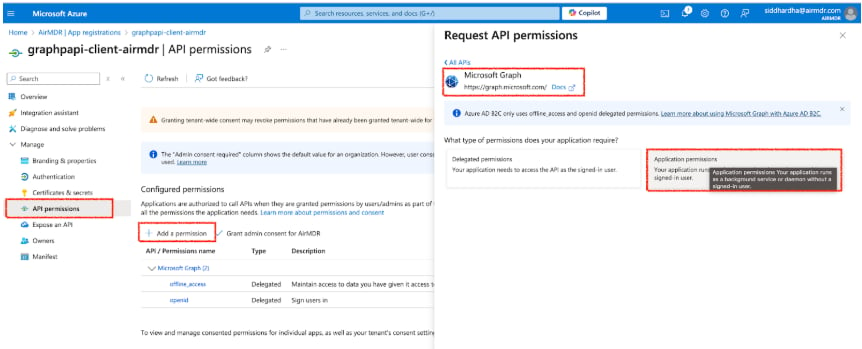 5. To use the Skills in AirMDR Integration select the required permissions as stated below:
**SecurityAlert.Read.All** and **SecurityIncident.Read.All** are mandatory
Preferably provide other application permissions for better enrichment of the cases.
| **Skill Name** | **Application permission** | **Endpoint** |
| :---------------------------------------------------------------------- | :----------------------------------------------------------------------------------------------------------------------------------------------------- | :------------------------------------------------------------------------------------------------------------------------------------ |
| Disable/Enable User | User.EnableDisableAccount.All + [User.Read](http://User.Read).All, or User.ReadWrite.All | PATCH /v1.0/users/\{id} (accountEnabled) |
| Reset User Password | User-PasswordProfile.ReadWrite.All — app must also hold the User Administrator Entra role | PATCH /v1.0/users/\{id} (passwordProfile) |
| Revoke Sign-In Session | User.RevokeSessions.All | POST /v1.0/users/\{id}/revokeSignInSessions |
| Fetch User Details | [User.Read](http://User.Read).All | GET /v1.0/users / /users/\{id} |
| List Microsoft Graph Users | [User.Read](http://User.Read).All (User.ReadBasic.All only for basic props) | GET /v1.0/users |
| Fetch User Groups | [Directory.Read](http://Directory.Read).All — app-only does not accept [User.Read](http://User.Read).All here | GET /v1.0/users/\{id}/memberOf |
| Fetch User Sign-In Logs · Microsoft Graph Fetch User Signin Logs | [AuditLog.Read](http://AuditLog.Read).All (+ [Policy.Read](http://Policy.Read).All to get appliedConditionalAccessPolicies) | GET /v1.0/auditLogs/signIns |
| Fetch Audit Logs | [AuditLog.Read](http://AuditLog.Read).All | GET /v1.0/auditLogs/\{directoryAudits\|signIns\|provisioning} |
| List Graph API Security Alerts · List Graph Api Alerts | [SecurityAlert.Read](http://SecurityAlert.Read).All | GET /v1.0/security/alerts\_v2 |
| List Incidents | [SecurityIncident.Read](http://SecurityIncident.Read).All | GET /v1.0/security/incidents |
| Get Incident | [SecurityIncident.Read](http://SecurityIncident.Read).All | GET /v1.0/security/incidents/\{id} |
| Update Incident | SecurityIncident.ReadWrite.All | PATCH /v1.0/security/incidents/\{id} |
| Create Incident Comment | SecurityIncident.ReadWrite.All | POST /v1.0/security/incidents/\{id}/comments |
| Run Hunting Query | [ThreatHunting.Read](http://ThreatHunting.Read).All | POST /v1.0/security/runHuntingQuery |
| Get Vulnerability | [ThreatIntelligence.Read](http://ThreatIntelligence.Read).All — requires a Defender TI portal + API add-on license | GET /v1.0/security/threatIntelligence/vulnerabilities/\{id} |
| List Microsoft Graph Risky Users | [IdentityRiskyUser.Read](http://IdentityRiskyUser.Read).All — Entra ID P2 | GET /v1.0/identityProtection/riskyUsers |
| Confirm Microsoft Graph User Compromised | IdentityRiskyUser.ReadWrite.All — Entra ID P2 | POST /v1.0/identityProtection/riskyUsers/confirmCompromised |
| Dismiss Microsoft Graph User Risk | IdentityRiskyUser.ReadWrite.All — Entra ID P2 | POST /v1.0/identityProtection/riskyUsers/dismiss |
| List Microsoft Graph Devices | [Device.Read](http://Device.Read).All | GET /v1.0/devices |
| Get Microsoft Graph Device | [Device.Read](http://Device.Read).All | GET /v1.0/devices/\{id} |
| Send Email | Mail.Send | POST /v1.0/users/\{id}/sendMail |
| Microsoft Graph Fetch Office Calendar · Fetch Office Calendar on userId | [Calendars.Read](http://Calendars.Read) (Calendars.ReadBasic if only names/ids needed) | GET /v1.0/users/\{id}/calendars |
| List Analyzed Emails | [SecurityAnalyzedMessage.Read](http://SecurityAnalyzedMessage.Read).All — Defender for Office 365 P2 / M365 E5 | GET /beta/security/collaboration/analyzedEmails |
| Remediate Analyzed Email | SecurityAnalyzedMessage.ReadWrite.All — Defender for Office 365 P2 / M365 E5 | POST /beta/security/collaboration/analyzedEmails/remediate |
| App Consent and Permission Profiler | [DelegatedPermissionGrant.Read](http://DelegatedPermissionGrant.Read).All + [Application.Read](http://Application.Read).All | GET /v1.0/\{users\|servicePrincipals}/\{id}/oauth2PermissionGrants, /appRoleAssignments, /appRoleAssignedTo, /servicePrincipals/\{id} |
| PIM and Entra Role Management Profiler | [RoleManagement.Read.Directory](http://RoleManagement.Read.Directory) (or [RoleManagement.Read](http://RoleManagement.Read).All) — Entra ID P2 for PIM | GET /v1.0/roleManagement/directory/\{roleEligibilityScheduleInstances,roleAssignmentScheduleInstances,roleAssignmentScheduleRequests} |
| Application and Service Principal Profiler | [Application.Read](http://Application.Read).All | GET /v1.0/applications, /servicePrincipals, /\{...}/owners |
| Mailbox Rule and Forwarding Profiler | [MailboxSettings.Read](http://MailboxSettings.Read) | GET /v1.0/users/\{id}/mailFolders/inbox/messageRules, /mailboxSettings |
6. Click on **Add Permissions**.
7. In API permissions, click **Grant admin consent**.
8. In the **Grant admin consent** confirmation modal, click **Yes**.
5. To use the Skills in AirMDR Integration select the required permissions as stated below:
**SecurityAlert.Read.All** and **SecurityIncident.Read.All** are mandatory
Preferably provide other application permissions for better enrichment of the cases.
| **Skill Name** | **Application permission** | **Endpoint** |
| :---------------------------------------------------------------------- | :----------------------------------------------------------------------------------------------------------------------------------------------------- | :------------------------------------------------------------------------------------------------------------------------------------ |
| Disable/Enable User | User.EnableDisableAccount.All + [User.Read](http://User.Read).All, or User.ReadWrite.All | PATCH /v1.0/users/\{id} (accountEnabled) |
| Reset User Password | User-PasswordProfile.ReadWrite.All — app must also hold the User Administrator Entra role | PATCH /v1.0/users/\{id} (passwordProfile) |
| Revoke Sign-In Session | User.RevokeSessions.All | POST /v1.0/users/\{id}/revokeSignInSessions |
| Fetch User Details | [User.Read](http://User.Read).All | GET /v1.0/users / /users/\{id} |
| List Microsoft Graph Users | [User.Read](http://User.Read).All (User.ReadBasic.All only for basic props) | GET /v1.0/users |
| Fetch User Groups | [Directory.Read](http://Directory.Read).All — app-only does not accept [User.Read](http://User.Read).All here | GET /v1.0/users/\{id}/memberOf |
| Fetch User Sign-In Logs · Microsoft Graph Fetch User Signin Logs | [AuditLog.Read](http://AuditLog.Read).All (+ [Policy.Read](http://Policy.Read).All to get appliedConditionalAccessPolicies) | GET /v1.0/auditLogs/signIns |
| Fetch Audit Logs | [AuditLog.Read](http://AuditLog.Read).All | GET /v1.0/auditLogs/\{directoryAudits\|signIns\|provisioning} |
| List Graph API Security Alerts · List Graph Api Alerts | [SecurityAlert.Read](http://SecurityAlert.Read).All | GET /v1.0/security/alerts\_v2 |
| List Incidents | [SecurityIncident.Read](http://SecurityIncident.Read).All | GET /v1.0/security/incidents |
| Get Incident | [SecurityIncident.Read](http://SecurityIncident.Read).All | GET /v1.0/security/incidents/\{id} |
| Update Incident | SecurityIncident.ReadWrite.All | PATCH /v1.0/security/incidents/\{id} |
| Create Incident Comment | SecurityIncident.ReadWrite.All | POST /v1.0/security/incidents/\{id}/comments |
| Run Hunting Query | [ThreatHunting.Read](http://ThreatHunting.Read).All | POST /v1.0/security/runHuntingQuery |
| Get Vulnerability | [ThreatIntelligence.Read](http://ThreatIntelligence.Read).All — requires a Defender TI portal + API add-on license | GET /v1.0/security/threatIntelligence/vulnerabilities/\{id} |
| List Microsoft Graph Risky Users | [IdentityRiskyUser.Read](http://IdentityRiskyUser.Read).All — Entra ID P2 | GET /v1.0/identityProtection/riskyUsers |
| Confirm Microsoft Graph User Compromised | IdentityRiskyUser.ReadWrite.All — Entra ID P2 | POST /v1.0/identityProtection/riskyUsers/confirmCompromised |
| Dismiss Microsoft Graph User Risk | IdentityRiskyUser.ReadWrite.All — Entra ID P2 | POST /v1.0/identityProtection/riskyUsers/dismiss |
| List Microsoft Graph Devices | [Device.Read](http://Device.Read).All | GET /v1.0/devices |
| Get Microsoft Graph Device | [Device.Read](http://Device.Read).All | GET /v1.0/devices/\{id} |
| Send Email | Mail.Send | POST /v1.0/users/\{id}/sendMail |
| Microsoft Graph Fetch Office Calendar · Fetch Office Calendar on userId | [Calendars.Read](http://Calendars.Read) (Calendars.ReadBasic if only names/ids needed) | GET /v1.0/users/\{id}/calendars |
| List Analyzed Emails | [SecurityAnalyzedMessage.Read](http://SecurityAnalyzedMessage.Read).All — Defender for Office 365 P2 / M365 E5 | GET /beta/security/collaboration/analyzedEmails |
| Remediate Analyzed Email | SecurityAnalyzedMessage.ReadWrite.All — Defender for Office 365 P2 / M365 E5 | POST /beta/security/collaboration/analyzedEmails/remediate |
| App Consent and Permission Profiler | [DelegatedPermissionGrant.Read](http://DelegatedPermissionGrant.Read).All + [Application.Read](http://Application.Read).All | GET /v1.0/\{users\|servicePrincipals}/\{id}/oauth2PermissionGrants, /appRoleAssignments, /appRoleAssignedTo, /servicePrincipals/\{id} |
| PIM and Entra Role Management Profiler | [RoleManagement.Read.Directory](http://RoleManagement.Read.Directory) (or [RoleManagement.Read](http://RoleManagement.Read).All) — Entra ID P2 for PIM | GET /v1.0/roleManagement/directory/\{roleEligibilityScheduleInstances,roleAssignmentScheduleInstances,roleAssignmentScheduleRequests} |
| Application and Service Principal Profiler | [Application.Read](http://Application.Read).All | GET /v1.0/applications, /servicePrincipals, /\{...}/owners |
| Mailbox Rule and Forwarding Profiler | [MailboxSettings.Read](http://MailboxSettings.Read) | GET /v1.0/users/\{id}/mailFolders/inbox/messageRules, /mailboxSettings |
6. Click on **Add Permissions**.
7. In API permissions, click **Grant admin consent**.
8. In the **Grant admin consent** confirmation modal, click **Yes**. 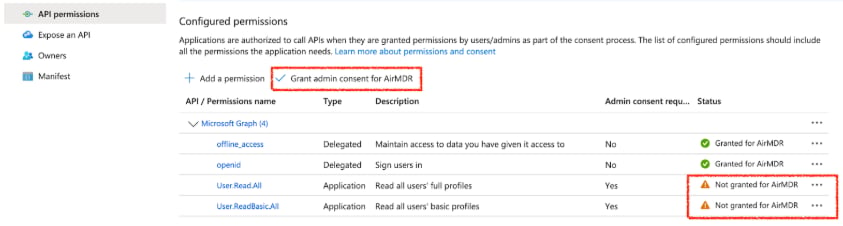 1. In the left navigation pane, go to **Manage** → **Certificates & secrets.**
2. Select **Client Secrets** tab.
3. Click **+ New client secret.**
1. In the left navigation pane, go to **Manage** → **Certificates & secrets.**
2. Select **Client Secrets** tab.
3. Click **+ New client secret.** 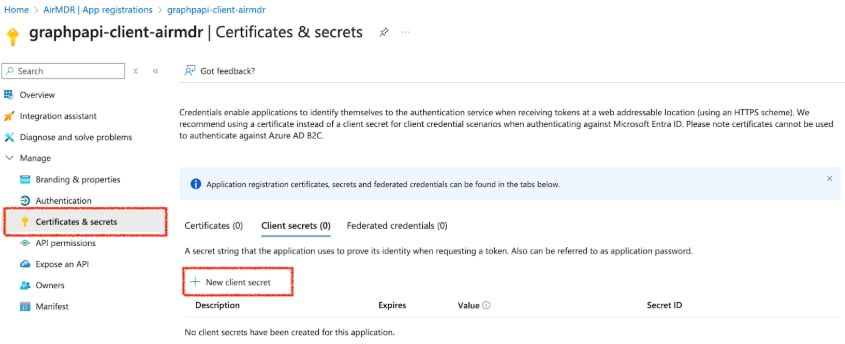 4. Add a **description** and **expiration period.**
5. Click **Add**.
Copy and securely save the **Client Secret Value** (it won’t be shown again)
To access the Client ID, and the Tenant ID to use in Graph API authentication
1. Go to [Azure Portal](https://portal.azure.com/).
2. Navigate to **Azure Active Directory.**
3. Click **App registrations.**
4. Select your **registered app.**
5. Under the **Overview** section, locate the **Application (client) ID** and **Tenant ID (Directory ID).**
6. Click the **Copy** icon **📋** next to the Client ID, and the Tenant ID respectively.
Now, your **Tenant ID** and **Client ID** are copied and ready to use for authentication in Microsoft Graph API.
Share the **Tenant ID**, **Client ID**, and **Client Secret Value** securely with the AirMDR operations team or self-configure them in the AirMDR Integrations Dashboard.
### Skills Provided by this Integration
| Skill ID | Purpose |
| :----------------- | :------------------------------ |
| **Calendars.Read** | Fetch Office Calendar on userId |
### Configure Microsoft Graph in AirMDR Integrations Dashboard
1. Navigate to [AirMDR](https://app.airmdr.com/auth/login), provide the credentials and click **Login.**
4. Add a **description** and **expiration period.**
5. Click **Add**.
Copy and securely save the **Client Secret Value** (it won’t be shown again)
To access the Client ID, and the Tenant ID to use in Graph API authentication
1. Go to [Azure Portal](https://portal.azure.com/).
2. Navigate to **Azure Active Directory.**
3. Click **App registrations.**
4. Select your **registered app.**
5. Under the **Overview** section, locate the **Application (client) ID** and **Tenant ID (Directory ID).**
6. Click the **Copy** icon **📋** next to the Client ID, and the Tenant ID respectively.
Now, your **Tenant ID** and **Client ID** are copied and ready to use for authentication in Microsoft Graph API.
Share the **Tenant ID**, **Client ID**, and **Client Secret Value** securely with the AirMDR operations team or self-configure them in the AirMDR Integrations Dashboard.
### Skills Provided by this Integration
| Skill ID | Purpose |
| :----------------- | :------------------------------ |
| **Calendars.Read** | Fetch Office Calendar on userId |
### Configure Microsoft Graph in AirMDR Integrations Dashboard
1. Navigate to [AirMDR](https://app.airmdr.com/auth/login), provide the credentials and click **Login.** 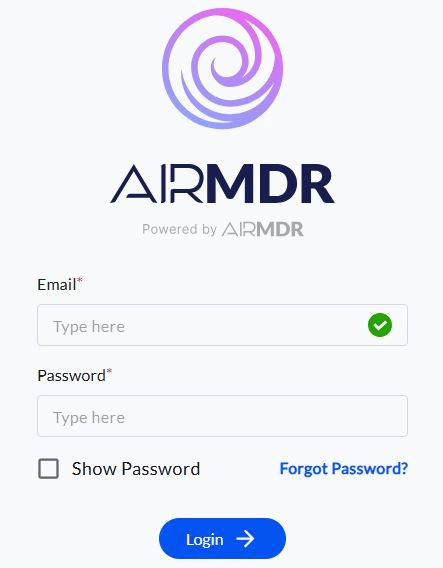 2. Navigate to the AirMDR Integrations Dashboard in the left navigation pane and select **Integrations.**
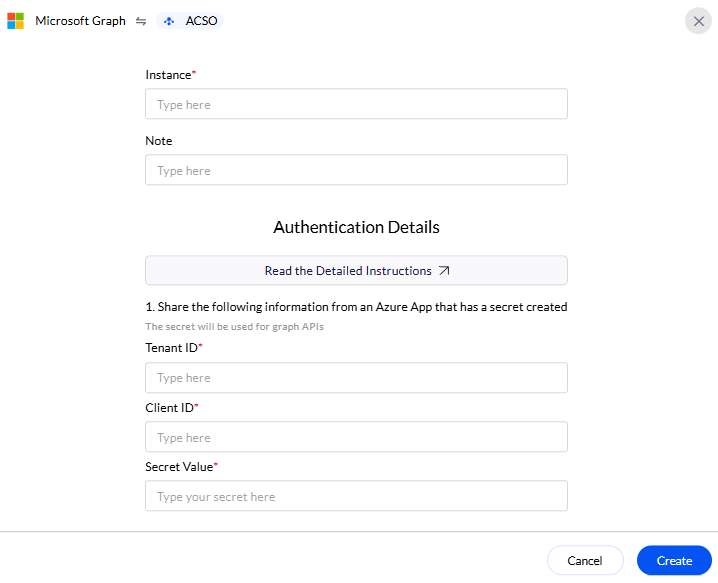
 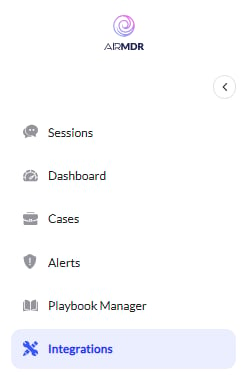 3. Use the search option, enter the keyword "**Microsoft Graph**", select the **Connections** tab, and click the **+ Create** icon.
  4. Enter the generated **Tenant ID, Client ID** and the **Client Secret** in the Authentication Details field params, and click **Create.**